Back to News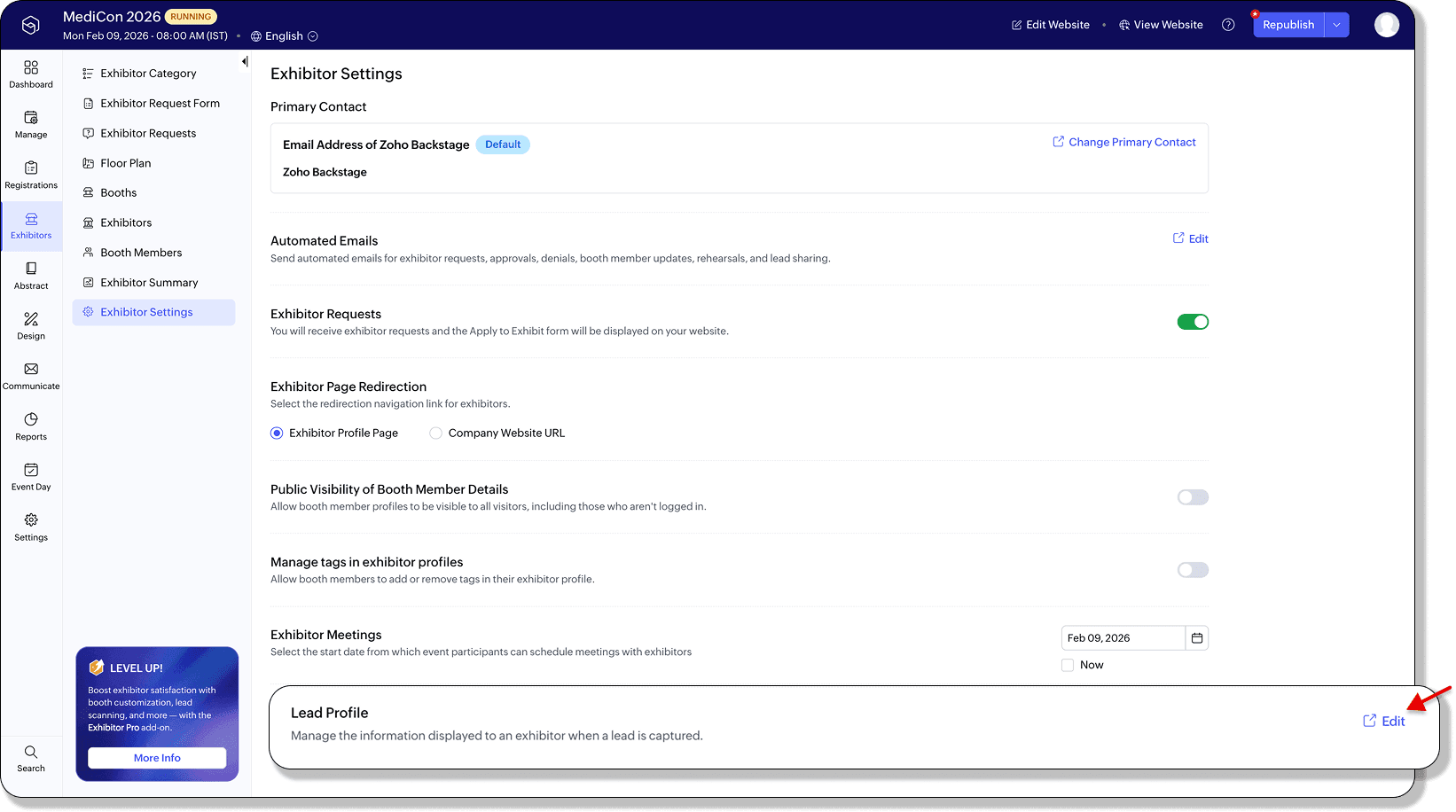
Wednesday, February 11, 2026
Zoho Backstage - What's New in January 2026
Zoho Backstage January 2026 updates include Lead Profile Settings for controlling exhibitor access to attendee data, ticket group links for targeted sharing, and extended QR code support in speaker and sponsor emails. You maintain full privacy control while improving event entry and registration distribution.
Get weekly Zoho updates
January brings updates to Zoho Backstage focused on lead management, ticket distribution, QR code support, and improved data control for event organizers.
- Lead Profile Settings allows event organizers to decide exactly what information exhibitor teams see when they scan attendee badges
- Exhibitors get only the details that matter while you stay in control of data visibility and privacy
- Configure Lead Profile Settings from Exhibitors > Exhibitor Settings > Lead Profile
- Organizers can choose relevant basic fields such as phone number, company, or designation
- Organizers can select custom registration fields to include in lead profiles
- Default fields like first name, last name, and email are always included and cannot be removed
- Settings apply across all exhibitors for the event once configured
- When exhibitors scan a badge, they see only the fields you have enabled directly in the mobile app under Lead Scan > Lead Profile
- Hidden registration fields cannot be added to lead profiles
- Any field removed from the registration form is automatically removed from the lead profile as well
- Especially useful for events like education fairs, job expos, and industry exhibitions
- Plan availability for Lead Profile Settings: Included in the Essentials, Premium, and Ultimate plans
- Ticket group links and IDs allow you to copy the Ticket Group ID or Ticket Group URL directly from ticket group options
- Ticket Group URL takes registrants straight to a specific ticket group on the Select Tickets page, perfect for targeted sharing
- Ticket Group ID can be used with the embeddable widget to display tickets from a specific group
- Support for Ticket Group ID will be extended to APIs once Ticket Group APIs are available
- Ticket group sharing is useful for embedding tickets on external websites or guiding attendees to a focused set of options
- Plan availability for Ticket group links and IDs: Included in the Free, Essentials, Premium, and Ultimate plans
- QR code support extended to more email types for smoother event entry and session access
- QR codes can now be added to emails sent to speakers, sponsors, exhibitors, and RSVP guests in addition to existing attendee emails
- Newly supported automated emails include Welcome Speaker and Session Updated emails for speakers
- Newly supported automated emails include Inform an early sponsor that the website is live and Welcome and thank a sponsor who contributes after the website is live emails for sponsors
- Newly supported automated emails include Exhibitor Request Approved and Invite Booth Member emails for exhibitors
- QR code support has been extended to scheduled emails sent to speakers, sponsors, exhibitors, and RSVP guests attending the event
- Plan availability for QR code support in automated emails: Included in the Free, Essentials, Premium, and Ultimate plans
- Plan availability for QR code support in scheduled emails: Included in the Essentials, Premium, and Ultimate plans
- All features and enhancements are available across all Zoho Backstage-supported data centers
 Zoho Backstage