Zoho Backstage - Redesigned Attendee App
The Zoho Backstage attendee app has been redesigned with faster navigation and a set of new tools for finding information, networking, and tracking event content. New capabilities include a persistent navigation bar, a personal Briefcase, in-app notes, and QR-based contact sharing.
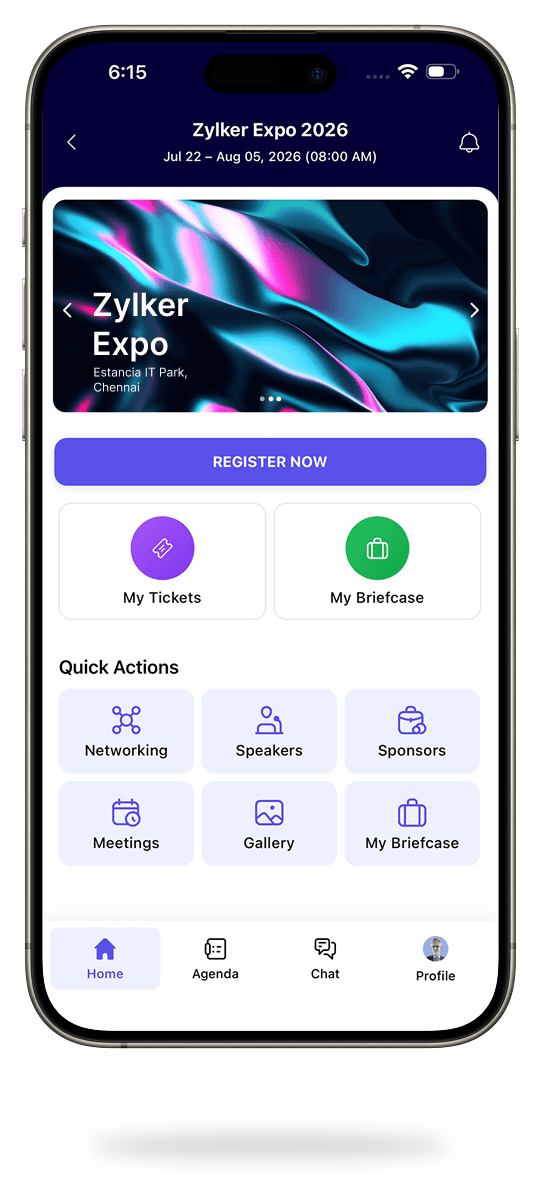
Zoho Backstage has redesigned its attendee app to make event information easier to access and participant interactions easier to manage.
- A persistent bottom navigation bar gives direct access to Home, Agenda, Chat, Profile, and Badge Scanning from anywhere in the app.
- The Home page has been reorganised to put key updates and favourite features first.
- Quick Actions on the Home page let attendees jump straight to speakers, sponsors, exhibitors, floor plans, saved content, and one-on-one meetings.
- A carousel banner on the Home page can highlight sponsors, partners, announcements, and promotional content.
- A new Briefcase brings saved sessions, bookmarked exhibitors and sponsors, notes, downloaded files, contacts, and gallery content into one place.
- In-context note taking lets attendees record notes within the app and revisit them from the Briefcase.
- Two-way contact sharing through badge QR scanning lets participants exchange details without manual entry.
- The exhibitor space lets exhibitors manage profile information, upload collateral, manage videos, and review attendee inquiries from the mobile app.
- The floor plan now supports a full-page view for exploring the venue layout and locating exhibitors.
- Organisers can create QR-based scavenger hunt tasks where attendees earn points by scanning codes and completing activities.
- Announcements now have separate read and unread sections, and attachments can be viewed within the app.
Availability: Ultimate plan.
What this means for you
A cleaner attendee app mainly benefits the people at your event, but the carousel banner and quick actions give sponsors and exhibitors more visibility, which can help when you're selling sponsorship packages.
If you run events on Backstage, review the new Home page layout before your next event so you know what attendees will see first.
Commentary from the Limitless IT Consultancy team.
 Zoho Backstage