Back to News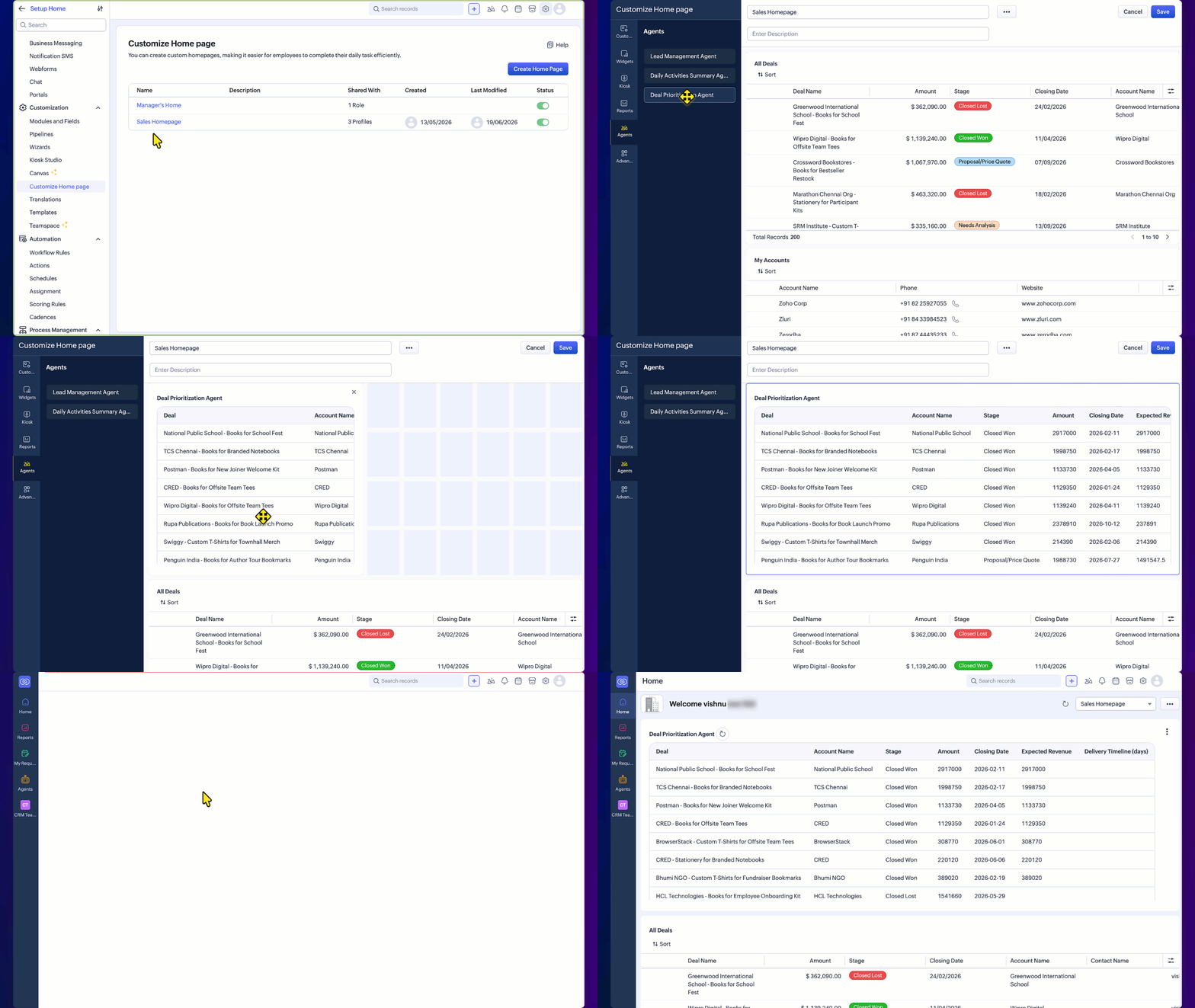
Friday, July 3, 2026
Zoho CRM - Agents on the Home Page
Zoho CRM now lets you add AI agents to your Home page so their insights appear alongside your dashboards and reports. Agents run on demand via a Get Agent Insights button and can be refreshed whenever you need the latest data.
Get weekly Zoho updates
Zoho CRM now lets you place AI agents directly on your Home page, so their insights appear alongside the tasks, deals, and pipeline you already track.
- A new Agents section appears when customising your Home page, alongside Dashboards, Custom Views, Reports, and other components, listing every agent configured in your CRM account.
- You can drag and drop one or more agents onto your Home page and arrange them together.
- Each agent component shows the agent's name and a Get Agent Insights button; clicking it runs the agent and displays its current insights, which you can refresh at any time.
- Running or refreshing an agent uses agent credits; adding an agent to your Home page or simply opening the page does not use credits.
- Agents that require field mapping at trigger time do not appear in the Agents section on the Home page.
Availability: Professional, Enterprise, and Ultimate editions of Zoho CRM.
 Zoho CRM