Zoho CRM - Dashboard Enhancements for Funnels, Duration and Date Filters
Zoho CRM has made four changes to dashboard components, including drill-down for the Funnel component and two new date filter operators. The Duration field is also no longer mandatory for KPIs, Target Meters, Funnels and Comparators.
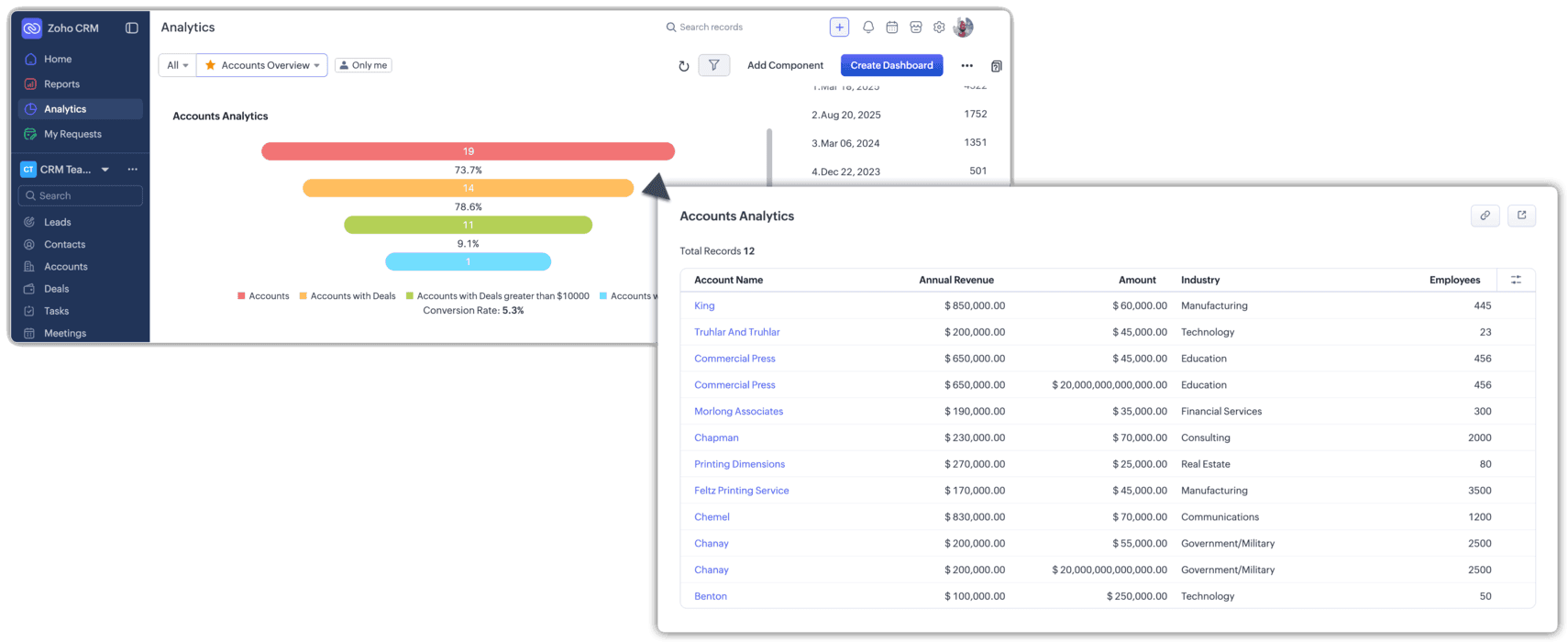
Zoho CRM is rolling out four dashboard improvements in phases, covering drill-down, the Duration field, date filter operators and week grouping labels.
- You can now click any stage in a Funnel component and drill down into the records behind that value, in the same way as other component types.
- Drill-down makes funnels usable for reviewing deal stages, lead progression and case resolution flows without leaving the dashboard.
- The Duration field is no longer mandatory for KPIs, Target Meters, Funnels and Comparators, so you can build these components against your whole dataset.
- You can still apply a date range to those components when you need a time-bound view.
- Date fields in both component filters and dashboard filters now support Before and After operators.
- The new operators let you filter on everything earlier or later than a single date, so you no longer need a workaround to avoid defining a full range.
- Components grouped by Week now show a start date to end date range instead of week numbers such as W12, 2026.
- The clearer week labels apply anywhere week-based grouping is used.
Availability: Being rolled out in phases across data centres.
What this means for you
Funnel drill-down is the change most teams will notice. Until now a funnel showed you where deals were stuck but not which deals; now a click takes you straight to the records, which makes funnels genuinely useful in pipeline reviews.
Dropping the mandatory Duration field also means KPIs and target meters can show all-time figures. If you rebuilt components elsewhere to get around that limit, it's a good moment to simplify your dashboards. Our Zoho CRM dashboards guide covers how to build these components step by step.
Commentary from the Limitless IT Consultancy team.
 Zoho CRM