Back to News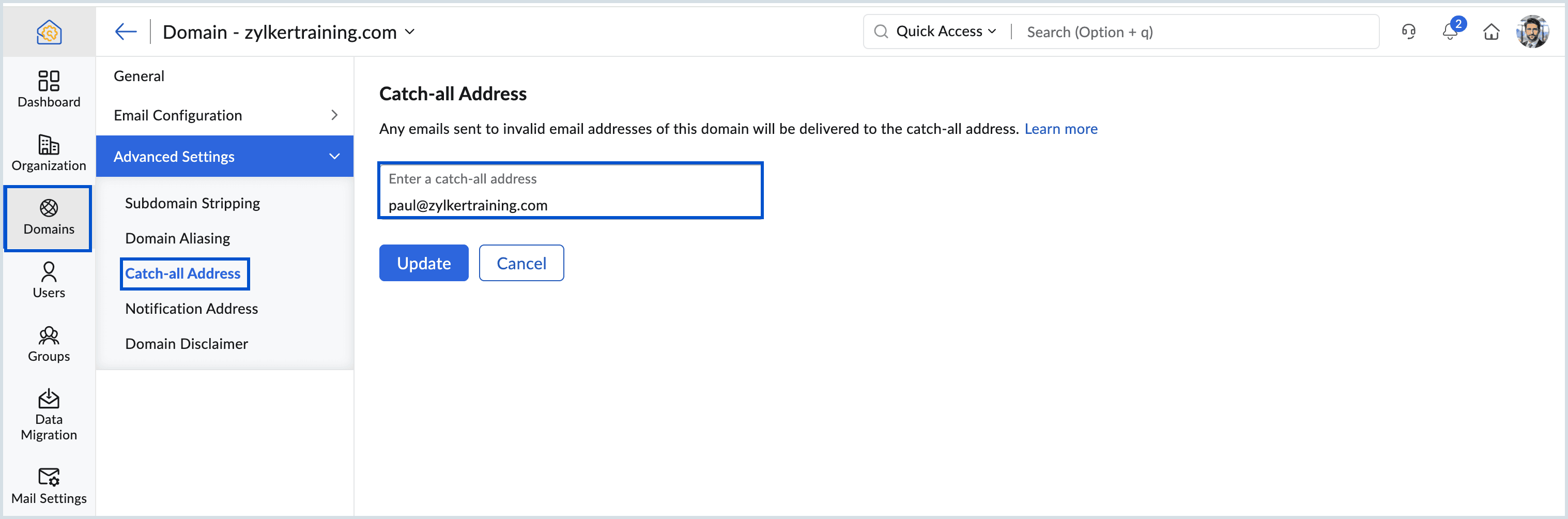
Friday, May 8, 2026
Zoho Mail - Catch-All Address for Misdirected Emails
Zoho Mail now supports a Catch-All Address that captures messages sent to invalid or mistyped addresses within your domain instead of letting them bounce. Admins can review the captured messages, correct the recipient, and route them to the right person.
Get weekly Zoho updates
Zoho Mail introduces Catch-All Address support so messages sent to invalid or mistyped addresses within your domain are routed to a designated mailbox instead of bouncing.
- Any email sent to a non-existent or mistyped local part within the domain is delivered to the configured catch-all mailbox rather than returned to the sender.
- Admins or anyone with mailbox access can review the captured messages, identify typos or naming-format errors, and forward them to the intended recipient.
- Useful for catching everyday typos, handling naming inconsistencies such as first.last versus last.first, and supporting legacy or retired addresses without bounces.
- Preserves messages from customers, partners, and vendors who use slightly incorrect addresses, helping protect external communication.
- Reduces the value of brute-force address discovery attempts, because attackers do not receive bounce responses that reveal which local parts are valid.
- Gives admins centralised visibility of misdirected mail, making it easier to spot recurring typos and reducing the support overhead of follow-up requests for missed messages.
- To configure, log in to the Zoho Mail Admin Console, go to Domains, select the relevant domain, open Advanced Settings, Catch-all Address, enter the mailbox or group address, and click Update.
- A valid mailbox or group within the organisation is required; if one does not already exist, create a mail account or group for use as the catch-all before configuring this setting.
 Zoho Mail